IndexNow for WordPress: Get New and Updated Pages Indexed in Minutes
IndexNow lets your site tell search engines the moment a page is published, updated or deleted, instead of waiting for a crawler to notice. It takes five minutes to set up in WordPress. Here is what it does, who supports it, and how to check it is really working.
What is IndexNow?
IndexNow is an open protocol that lets a website notify search engines instantly when a URL is added, updated or deleted. One ping to any participating engine is shared with all the others. Bing, Yandex, Naver, Seznam, Yep and Amazon use it. Google does not.
Without IndexNow, search engines find changes by recrawling your sitemap and pages on their own schedule. On a small or new site that can take days or weeks. With IndexNow, your site sends a short message the moment you hit Publish, and the engine can crawl that exact URL straight away.
IndexNow speeds up discovery. It does not guarantee indexing or rankings. A thin or duplicate page will still be crawled and then ignored.
Which search engines support IndexNow?
| Engine | Uses IndexNow | Why it matters |
|---|---|---|
| Microsoft Bing | Yes | Bing results also feed Copilot and are a major data source for ChatGPT search. |
| Yandex | Yes | Largest search engine in Russia and several nearby markets. |
| Naver | Yes | Leading search engine in South Korea. |
| Seznam.cz | Yes | Popular in the Czech Republic. |
| Yep | Yes | Independent search engine from the Ahrefs team. |
| Amazon | Yes | Listed as a participant by IndexNow. |
| No | Google said in 2021 it would test the protocol but has not adopted it. Google still relies on crawling and sitemaps. |
Source: indexnow.org, checked 27 September 2026. A ping to one engine is shared with all participants.
The Google answer surprises people, so to be clear: IndexNow does nothing for Google. For Google, a clean XML sitemap submitted in Search Console and good internal links remain the way to get pages found quickly. The URL Inspection tool can request indexing for a single important page.
IndexNow vs XML sitemaps vs Google’s Indexing API
| Method | Who uses it | Speed | Best for |
|---|---|---|---|
| IndexNow | Bing and other participants | Minutes | Telling engines about each change as it happens |
| XML sitemap | Every major engine, including Google | Hours to weeks, on the engine’s schedule | A complete list of URLs you want indexed |
| Google Indexing API | Google only | Fast | Officially only job posting and livestream pages; not for normal posts |
| URL Inspection, Request indexing | Google only | Hours to days | One important page at a time, by hand |
Use a sitemap and IndexNow together. They do different jobs and do not conflict.
Some plugins offer to push every WordPress post through Google’s Indexing API. Google’s documentation limits that API to job postings and livestream videos, so using it for ordinary content is outside its guidelines. I do not recommend it.
How to set up IndexNow in WordPress
Method 1: SEO Rank Genius (built in)
Go to SEO Rank Genius, then Indexing and Sitemaps, then Submission and Sync. Turn on Enable IndexNow and Auto Ping on Publish, then pick which post types to ping. The plugin generates and serves the key file for you, so there is nothing to upload and no account to register.
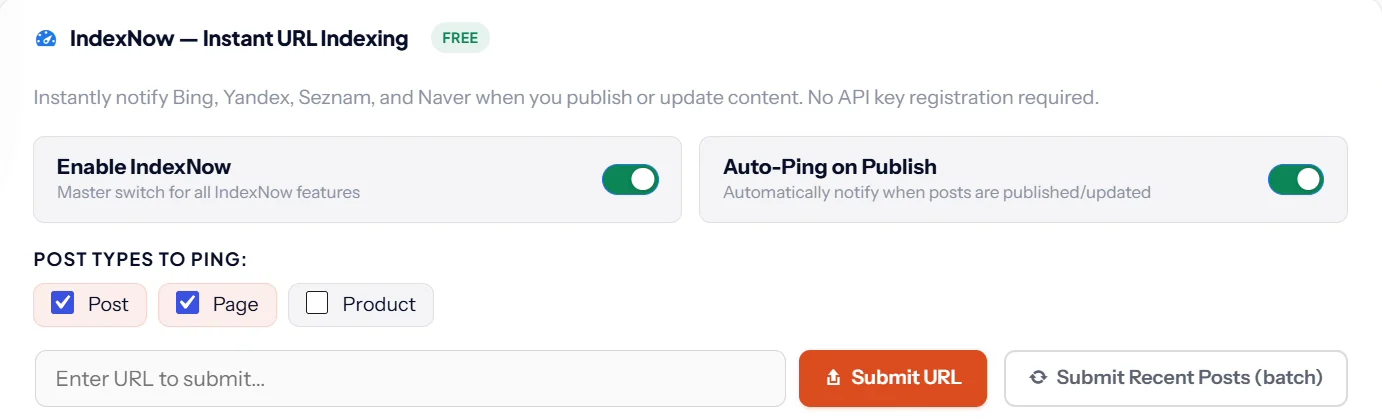
You can also paste any URL and click Submit URL, or send your recent posts in one batch after a big update. Every submission is logged with its response code, which makes problems easy to spot. It is included in every plan; see current pricing.
Method 2: Another plugin
Microsoft publishes an official IndexNow plugin for WordPress, and several SEO plugins include an IndexNow option. If you use Cloudflare, its Crawler Hints feature also sends IndexNow signals. Pick one source only. Two tools pinging the same URLs waste your quota and make the logs confusing.
Method 3: Manually, for developers
- Generate a key of 8 to 128 characters using letters, numbers and hyphens.
- Save it in a text file named after the key, for example
YOUR_KEY.txt, containing only the key, and upload it to your site root. - Ping a single URL with a GET request:
https://api.indexnow.org/indexnow?url=https://example.com/new-page/&key=YOUR_KEYOr submit up to 10,000 URLs in one POST request:
POST https://api.indexnow.org/indexnow
Content-Type: application/json; charset=utf-8

{
  "host": "example.com",
  "key": "YOUR_KEY",
  "keyLocation": "https://example.com/YOUR_KEY.txt",
  "urlList": [
    "https://example.com/new-page/",
    "https://example.com/updated-guide/"
  ]
}
How to check IndexNow is working
Every ping gets an HTTP response code. Your plugin log should show them; if it does not, that is a reason to switch plugins.
| Code | Meaning | What to do |
|---|---|---|
| 200 OK | URL submitted successfully | Nothing. It is working. |
| 202 Accepted | URL received, key check still pending | Normal on the first ping. It should turn into 200 on later pings. |
| 400 Bad request | The request format is wrong | Check the URL is complete and correctly encoded. |
| 403 Forbidden | The key is not valid: file missing, unreachable, or content does not match | Open yoursite.com/YOUR_KEY.txt in a private window. It must load and show only the key. |
| 422 Unprocessable | The URL does not belong to the host, or the key does not match the host | Make sure you only submit URLs on the domain the key file lives on. |
| 429 Too many requests | You are sending too much, too fast | Stop pinging unchanged URLs. Engines set their own daily limits. |
Source: IndexNow documentation.
For the full picture, add your site to Bing Webmaster Tools. Its IndexNow report shows the URLs Bing received and when, so you can confirm pings are arriving.
IndexNow mistakes to avoid
- Pinging unchanged pages. Only submit a URL when its content really changed. Constant pings for the same URL can get you rate limited.
- Submitting URLs that redirect or are noindexed. Ping the final, canonical URL only.
- Running two IndexNow tools. Pick the SEO plugin or the standalone plugin, not both.
- Forgetting deletions. When you remove a page, ping it too, so engines drop it faster instead of showing a dead result.
- Expecting Google to react. It will not. Keep your sitemap healthy for Google.
Where to go from here
IndexNow covers Bing and friends. For Google, make sure your XML sitemap is clean and submitted. If you are working through your whole setup, the WordPress SEO checklist covers every step in order.
SEO Rank Genius sends IndexNow pings automatically, logs every response and manages your sitemaps in the same place.