WordPress XML Sitemap Guide: Create, Submit to Google and Fix Errors
An XML sitemap is a list of the pages you want search engines to find. WordPress makes a basic one automatically, but most sites do better with a cleaner sitemap from an SEO plugin. This guide shows where yours is, how to submit it to Google and Bing, and how to fix the errors Search Console reports.
What is an XML sitemap?
An XML sitemap is a file that lists the URLs on your website you want search engines to crawl and index, often with the date each page last changed. It helps Google and Bing find new and updated pages faster, especially on new sites, large sites and pages with few internal links.
A sitemap does not guarantee indexing and it does not improve rankings on its own. It is a discovery tool: it tells search engines what exists. Pages still need to be good, and they still need internal links.
Here is what a small sitemap looks like:
<?xml version="1.0" encoding="UTF-8"?>
<urlset xmlns="http://www.sitemaps.org/schemas/sitemap/0.9">
  <url>
    <loc>https://example.com/boiler-service/</loc>
    <lastmod>2026-09-01</lastmod>
  </url>
  <url>
    <loc>https://example.com/blog/bleed-a-radiator/</loc>
    <lastmod>2026-08-14</lastmod>
  </url>
</urlset>
Where is my WordPress sitemap?
| Setup | Sitemap address |
|---|---|
| WordPress core (no SEO plugin) | yoursite.com/wp-sitemap.xml |
| Yoast SEO | yoursite.com/sitemap_index.xml |
| Rank Math | yoursite.com/sitemap_index.xml |
| SEO Rank Genius | yoursite.com/sitemap_index.xml |
| All in One SEO | yoursite.com/sitemap.xml |
When an SEO plugin creates its own sitemap, it normally switches off the WordPress core sitemap to avoid two copies.
Not sure which you have? Open yoursite.com/robots.txt. Most plugins add a Sitemap: line there that shows the exact address.
How to create an XML sitemap in WordPress
Option 1: Use the built in WordPress sitemap
Since WordPress 5.5, every site has a basic sitemap at /wp-sitemap.xml. It lists posts, pages, categories, tags and author archives. It works, but you cannot easily exclude thin pages, it includes author and tag archives most sites do not want indexed, and it does not include images.
Option 2: Use an SEO plugin (recommended)
An SEO plugin replaces the core sitemap with a sitemap index that splits content into smaller files, removes noindexed pages automatically, and adds image data. This is the better option for almost every site.
Option 3: An XML sitemap generator tool
Online XML sitemap generators crawl your site and give you a file to upload. They are useful for static sites, but on WordPress the file goes out of date as soon as you publish. A plugin sitemap updates itself, so there is no reason to use a static generator on WordPress.
What a good sitemap includes, and what it leaves out
| Include | Leave out |
|---|---|
| Published posts and pages you want in search | Pages marked noindex |
| Product and category pages that have content | Thin tag archives and empty categories |
| The canonical version of each URL | Redirected URLs, duplicates and URLs with tracking parameters |
| An accurate lastmod date | Login, cart, checkout and thank you pages |
| Images inside your pages | Attachment pages |
A sitemap should list only pages you would be happy to see in search results.
- Limits: one sitemap file can hold up to 50,000 URLs or 50 MB uncompressed. Larger sites use a sitemap index that points to several files.
- lastmod matters: Google uses the last modified date when it is consistently accurate. Only change it when the content really changes.
- priority and changefreq do not matter to Google: Google ignores both values. Other search engines may read them, but do not spend time tuning them.
How to submit a sitemap to Google
- Open Google Search Console and select your property.
- Go to Indexing, then Sitemaps.
- Under Add a new sitemap, type the sitemap path, for example
sitemap_index.xml, and click Submit. - Wait for the status to show Success. The report then shows how many URLs were discovered.
- Check Indexing, then Pages over the next weeks to see which listed URLs are indexed and why others are not.
You only need to submit once. Google rechecks the sitemap on its own schedule. Google retired its old sitemap ping address in 2023, so pinging Google is no longer possible or needed.
Submit to Bing too
In Bing Webmaster Tools, open Sitemaps and submit the same address, or import your site straight from Search Console. For instant updates on Bing and other engines, add IndexNow.
Add it to robots.txt
Listing the sitemap in robots.txt helps every crawler find it:
Sitemap: https://example.com/sitemap_index.xmlCommon sitemap errors in Search Console and how to fix them
| Error or status | What it means | How to fix it |
|---|---|---|
| Couldn’t fetch | Google could not load the file | Open the URL in a private window. Check security plugins, firewalls and caching are not blocking it. |
| Sitemap is HTML | Google got a web page, often a 404 page, instead of XML | Check the exact address, then resave permalinks in Settings, Permalinks. |
| Submitted URL marked noindex | The sitemap lists a page that tells Google not to index it | Remove it from the sitemap or remove the noindex, whichever is correct. |
| Submitted URL has redirect | A listed URL redirects elsewhere | List only the final URL. |
| Discovered, currently not indexed | Google knows the page but has not indexed it yet | Improve the content and add internal links. A sitemap alone will not fix this. |
| Two sitemaps submitted | Core and plugin sitemaps both in Search Console | Remove the old one and keep the plugin sitemap index. |
Most sitemap problems are really crawling, caching or quality problems.
XML sitemaps in SEO Rank Genius
In Indexing and Sitemaps, then XML Sitemap, switch the sitemap on, choose whether to use a sitemap index, set how many links go in each file, and pick which content types are included.
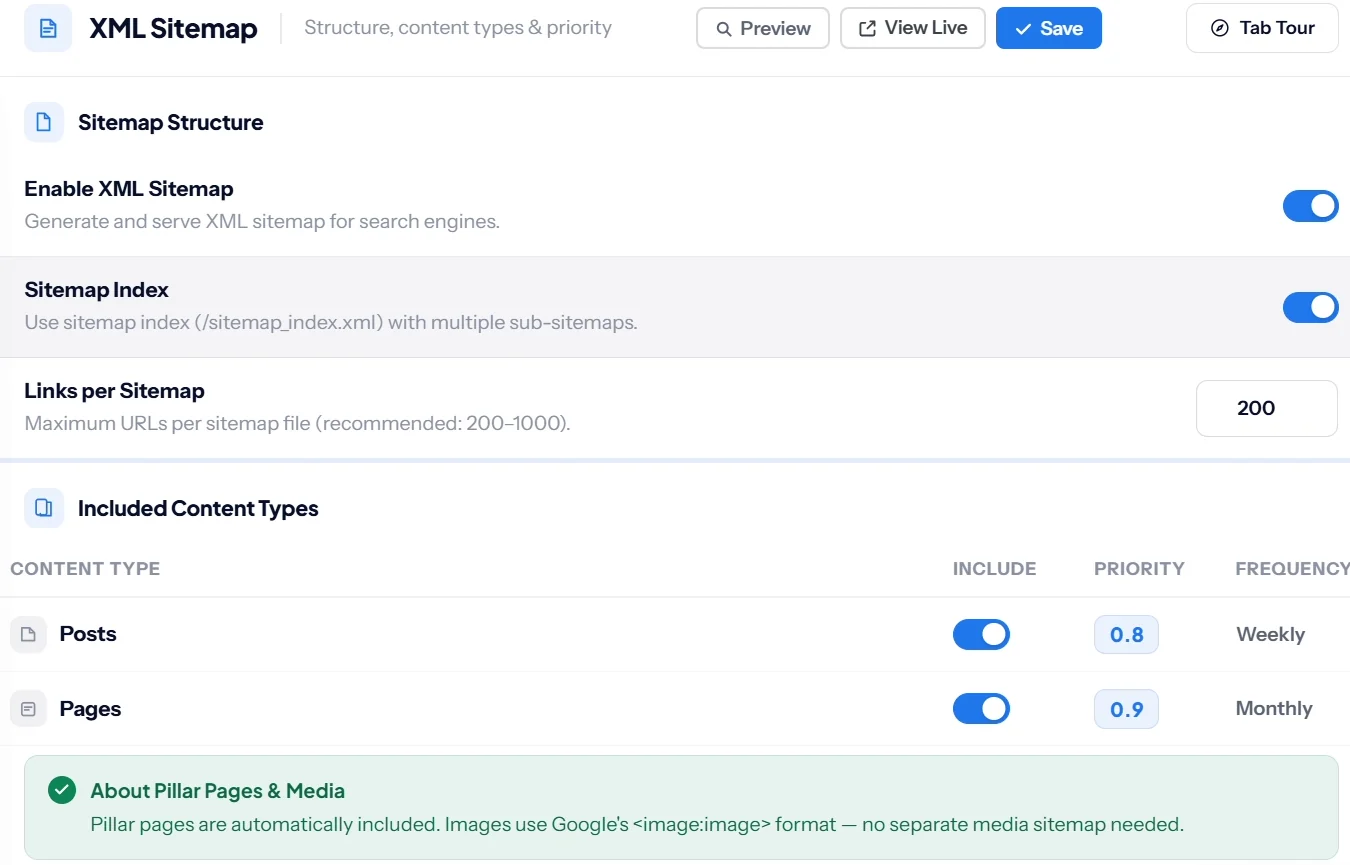
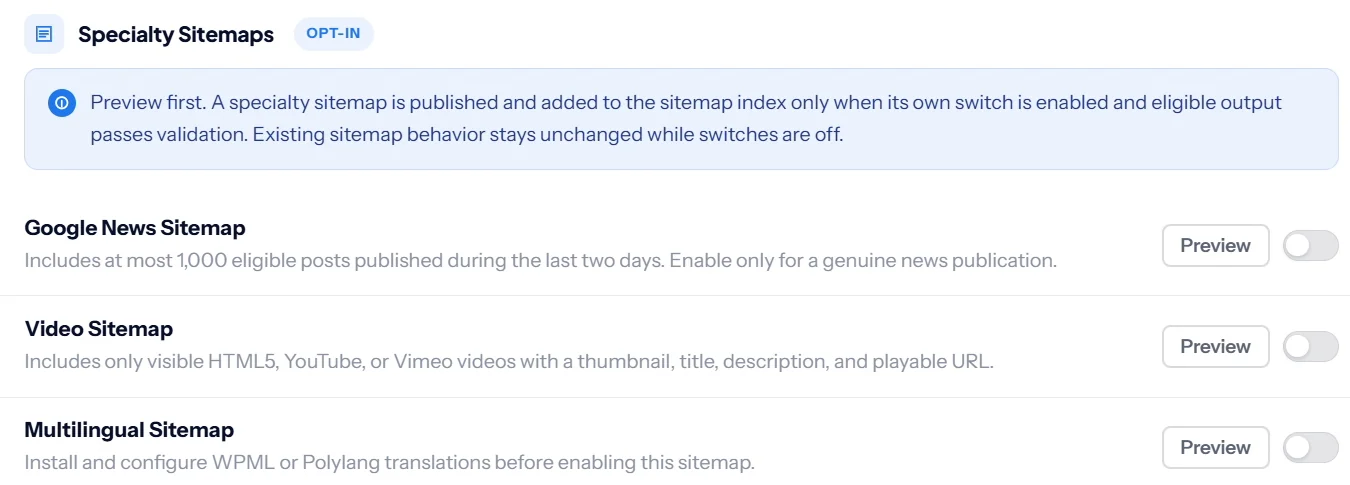
Images are included automatically, and specialty sitemaps for Google News, video and multilingual sites are opt in. You can preview each one before switching it on.
An optional HTML sitemap page for visitors can be grouped by pillar and cluster. Sitemaps are included in every plan; see current pricing.
Keep reading
Sitemaps help Google find pages; IndexNow tells Bing the moment they change. For the full setup in order, follow the WordPress SEO checklist.
SEO Rank Genius builds a sitemap index with images, drops noindexed pages automatically and adds news and video sitemaps when you need them.