Keyword Cannibalization: How to Find It, When It Matters, and How to Fix It in WordPress
Keyword cannibalization happens when two or more of your pages compete for the same search, so Google keeps switching between them and neither ranks as well as one strong page would. This guide shows how to confirm it with real data, how to tell it apart from harmless overlap, and which fix to use.
What is keyword cannibalization?
Keyword cannibalization is when several pages on your own site target the same search query with the same intent. Google cannot tell which one you want to rank, so it rotates between them or ranks both lower. The usual fix is to merge the pages, or to make each one clearly serve a different need.
A simple example. A plumbing site publishes How to fix a leaking tap in 2023 and Leaking tap repair guide in 2025. Both answer the same question for the same person. In Search Console you see both URLs collecting impressions for leaking tap fix, each sitting around position 12, and the one Google shows changes from week to week. One combined page would very likely do better than either.
The name is a little misleading. The problem is rarely the keyword itself. It is two pages trying to do the same job.
When cannibalization hurts, and when it does not
Not every overlap is a problem, and a lot of advice online treats it as if it were. Big sites have many pages that mention the same terms. Google also shows two results from one site when both are useful, and a blog post and a product page ranking together for the same query is often a win, not a loss.
| Situation | Is it a problem? | Why |
|---|---|---|
| Two posts answer the same question for the same reader | Yes | They split links, clicks and relevance. Neither is the clear best answer. |
| Rankings for a query swap between two URLs every few days | Yes | Google is unsure which page to trust, which usually means both are weaker. |
| A guide and a product page rank together for one query | Usually not | Different intent. Together they can take more of the results page. |
| Two pages mention a term but target different queries | No | Sharing words is not the same as competing for a search. |
| Category or tag archives ranking instead of the post | Sometimes | Thin archive pages can outrank the real content. Worth checking. |
The test is shared intent plus split performance, not shared words.
How to find keyword cannibalization
Method 1: Google Search Console (the most reliable)
Search Console shows real impressions for real queries, so it is the only method that proves two pages are competing rather than just similar.
- Open Performance, then Search results, and set the date range to the last 6 months.
- In the Queries tab, click a query that matters to your business.
- Switch to the Pages tab. If two or more of your URLs show meaningful impressions for that one query, note them.
- Click each URL and change the chart to show Average position. Positions that swap back and forth are the classic sign.
- Repeat for your top 20 to 50 queries. Start with the ones that bring leads or sales.
Method 2: A site search
Search Google for site:yourdomain.com "leaking tap". It will not tell you who ranks, but it quickly shows how many pages you have written on the same topic. It is a good way to spot old posts you forgot about.
Method 3: A keyword map
List every important page in a spreadsheet with its primary keyword and search intent. Sort by keyword. Duplicates jump out immediately. This takes an hour on a small site and it is the best way to stop the problem coming back.
Method 4: A cannibalization report in your SEO plugin
A plugin can compare titles, headings, focus keywords and categories across every post at once, then use Search Console data to confirm which pairs really share queries. That is how I check sites in SEO Rank Genius; the walkthrough is further down.
How to fix keyword cannibalization: pick the right fix
There are five fixes. Choosing the wrong one is how people lose traffic, so decide with this table before touching anything.
| What you found | Best fix | What happens to the weaker page |
|---|---|---|
| Same intent, one page clearly stronger | Merge the useful parts into the stronger page, then 301 redirect the weaker one | Removed and redirected |
| Same intent, both pages have value | Combine into one new, better page on the stronger URL, redirect the other | Removed and redirected |
| Different intent, but Google is confused | Differentiate: change titles, headings and focus so each targets its own query, and link between them | Kept, retargeted |
| Near duplicate that must exist, such as a print version or filtered product list | Add a canonical tag pointing to the main page | Kept, not indexed as its own result |
| Thin archive or tag page competing with a real post | Noindex the archive, keep the post | Kept for visitors, dropped from search |
Merging with a redirect is the fix in most real cases.
Three details make the difference between a merge that works and one that drops traffic:
- Keep the URL with the most backlinks, even if the other page has the better content. Move the content, not the URL.
- Do not delete without a redirect. A deleted page returns a 404 and throws away every link pointing at it.
- Update your internal links. Links should point at the final URL, not through a redirect. The internal linking guide explains why.
After a merge, expect rankings to wobble for one to four weeks while Google recrawls both URLs. Check the query again in Search Console after a month.
Finding and fixing cannibalization in WordPress with SEO Rank Genius
Go to SEO Rank Genius, then Tools and Analytics, then Cannibalization, and click Scan Now. The detector compares every pair of posts and pages and sorts the results by severity.
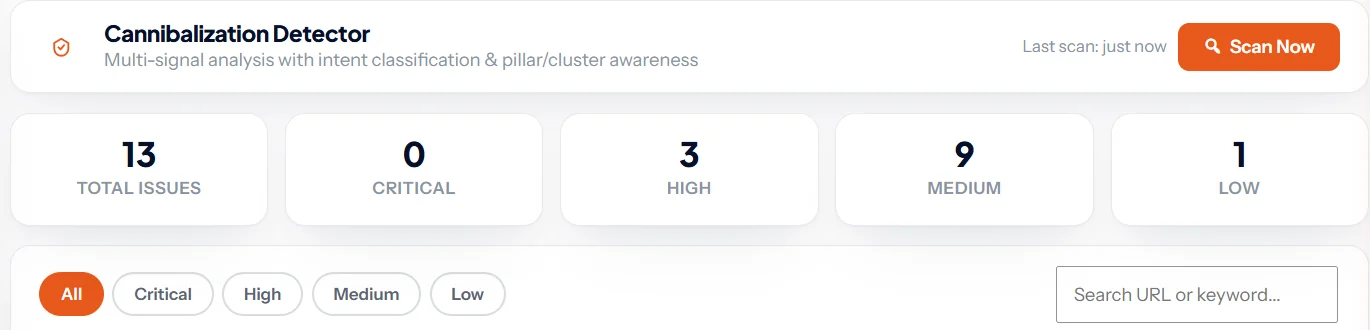
Each issue shows both pages, their focus keywords and the detected search intent, then explains the risk and the recommended fix in plain words. The signal chips show exactly why the pair was flagged: keyword overlap, title similarity, heading overlap, same category, missing internal link and meta description similarity.
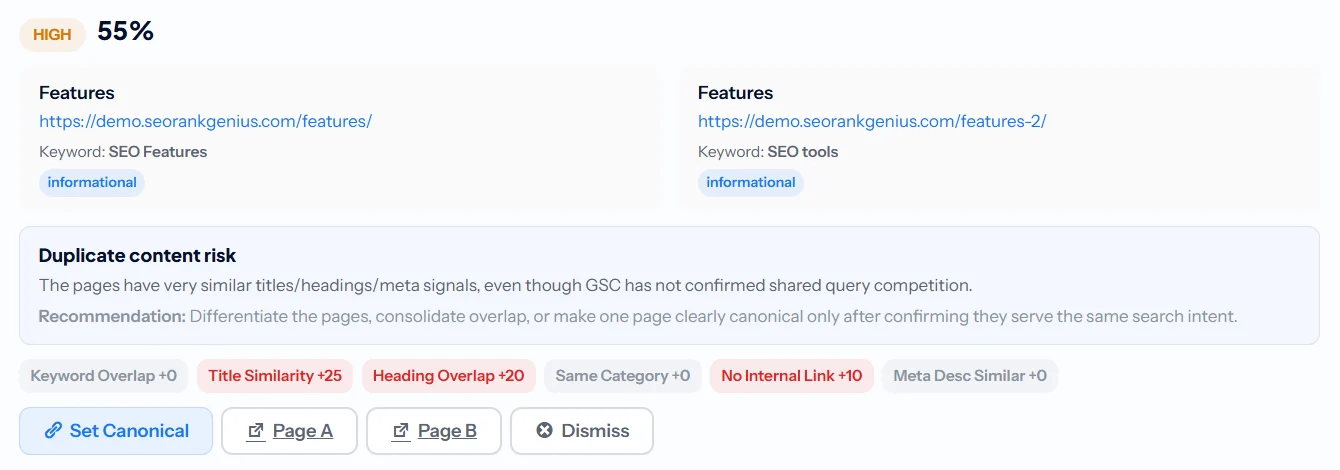
Two things I care about in how it scores. First, pages with different search intent get a large score reduction, so a guide and a product page are not flagged as a crisis. Second, when Search Console is connected, it tells you whether the pages really share queries, so you know whether you are looking at confirmed competition or just similar pages that need a review.
From the issue card you can set a canonical in one click. For merges, move the content in the editor and add a 301 in URL Redirects; changing a slug in the editor creates the redirect automatically. Detection, redirects and the rest of the toolkit are in every plan; see current pricing.
How to prevent keyword cannibalization
- Keep a keyword map and check it before you write anything new. If a page already targets the query, update that page instead.
- Organise content into topic clusters. One pillar page owns the broad query; each supporting article owns one narrower question.
- Set one focus keyword per page in your SEO plugin, and never reuse it on another page.
- Refresh instead of republishing. A 2026 version of a 2023 post should replace the old one on the same URL, not sit next to it.
- Link related pages to each other with descriptive anchors. Clear internal links tell Google which page is the main one. Pages with no links at all are a separate problem covered in the orphan pages guide.
- Run a cannibalization check every quarter, or after any big publishing push.
Where to go from here
Once your competing pages are merged, make sure the survivors are well connected. Read the internal linking guide next, then plan future content with topic clusters so each page has one clear job.
SEO Rank Genius compares every post and page, confirms real competition with Search Console data and lets you set canonicals and redirects in the same place.