What Is llms.txt? How to Add It to WordPress (and What It Really Does)
llms.txt is a small Markdown file that gives AI tools a clean map of your website. This guide explains what it is, what it can and cannot do for your traffic, and three ways to add one to WordPress in a few minutes.
What is llms.txt?
llms.txt is a plain text file written in Markdown that sits at the root of your site, at yoursite.com/llms.txt. It gives AI tools a short summary of your site and a list of your most useful pages, so they can understand it without reading every page. It does not affect Google rankings and it does not block or allow any crawler.
The idea was proposed by Jeremy Howard on 3 September 2024, and version 2 of the proposal was published on 10 August 2026. The problem it addresses is simple. Web pages are built for people, with menus, banners, scripts and footers. An AI system reading your site wastes much of its limited context on that clutter. A single clean Markdown file points it straight to the pages that matter.
- It lives at
/llms.txton your domain, like robots.txt. - It is written in Markdown: a title, a one paragraph summary, then lists of links.
- It is a suggestion for AI tools, not a rule. Nothing forces an AI system to read it.
- Google Search ignores it completely. So do most AI crawlers today.
What goes inside an llms.txt file
The format is deliberately simple. Only the first line is required. Here is the structure the proposal describes, in order:
- A title: one H1 line with the name of your site or business.
- A summary: a short blockquote (lines starting with >) saying what the site is and who it is for.
- Optional notes: a few plain paragraphs with anything an AI should know, such as your service area.
- Sections of links: H2 headings, each followed by a list of links with a short description.
- An Optional section: links an AI can skip when it is short on space.
A small business file might look like this:
# Northwind Plumbing

> Family run plumbing company in Leeds. Emergency repairs, boiler servicing
> and bathroom installs since 2009. Prices and service areas are on the pages below.

## Services
- [Emergency plumber](https://example.com/emergency-plumber/): 24 hour callouts in Leeds
- [Boiler servicing](https://example.com/boiler-service/): annual service and safety checks

## Help
- [Pricing](https://example.com/pricing/): fixed prices for common jobs
- [Contact](https://example.com/contact/): phone, email and opening hours

## Optional
- [Blog](https://example.com/blog/): maintenance tips and how to guides
Some tools also generate llms-full.txt, a longer file that contains the text of your key pages, not just links. It is not part of the official proposal, but several AI coding and research tools look for it. It is useful for documentation sites; on a normal blog it mostly duplicates your content.
Does llms.txt help SEO or AI search? The honest answer
This is where most guides overpromise, so here is exactly what the evidence says.
Crawler logs tell the same story. One monitoring study of more than 500 million AI bot requests over 90 days found only a few hundred requests for /llms.txt. GPTBot, ClaudeBot, PerplexityBot and Google Extended overwhelmingly read your normal HTML pages instead.
So why bother? Three honest reasons:
- AI agents and assistants that a person points at your site, for example to compare products or read documentation, can use the file as a shortcut.
- Developer and documentation tools are the most active users of llms.txt today. If you run a software or docs site, it is worth having.
- It costs nothing. A plugin keeps it up to date automatically, so there is no downside and a small possible upside as support grows.
What actually earns citations in ChatGPT, Perplexity and Google AI Overviews is content quality, clear structure and structured data. I cover that in the full guide to AI SEO for WordPress.
llms.txt vs robots.txt vs XML sitemap
These three files are often confused. They do completely different jobs:
| File | Who reads it | What it does | Can it block crawlers? |
|---|---|---|---|
| robots.txt | Every major search and AI crawler | Tells bots which URLs they may crawl | Yes, this is its job |
| XML sitemap | Search engines | Lists every URL you want indexed | No |
| llms.txt | Some AI tools and agents | Summarises the site and points to key pages | No |
If you want to stop AI companies training on your content, llms.txt will not do it. You need rules in robots.txt. And if you want new pages found fast, a clean XML sitemap plus IndexNow does far more.
How to add llms.txt to WordPress: 3 methods
Method 1: Use an llms.txt generator plugin (SEO Rank Genius)
This is the method I use, because the file stays current every time you publish. Go to SEO Rank Genius, then Tools and Analytics, then llms.txt, and switch on the experimental AI content guide.
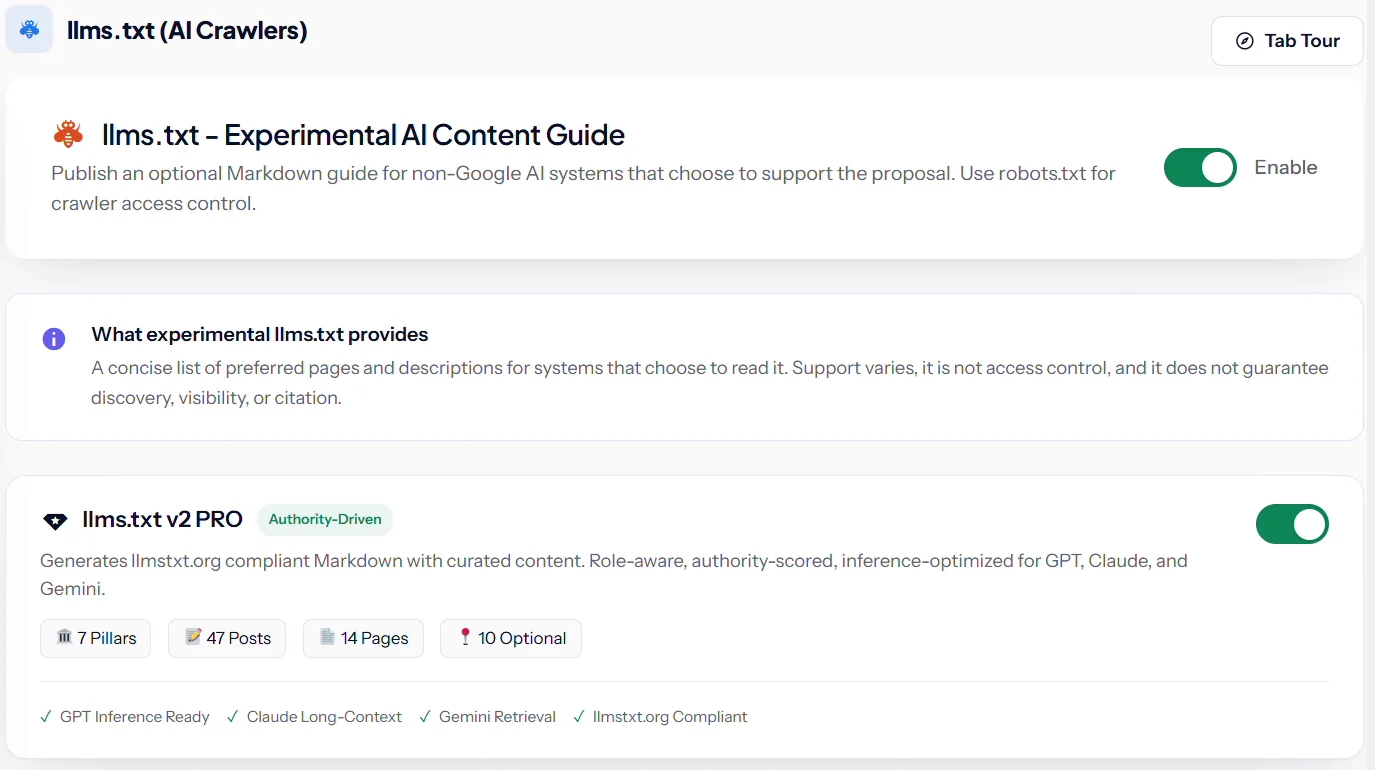
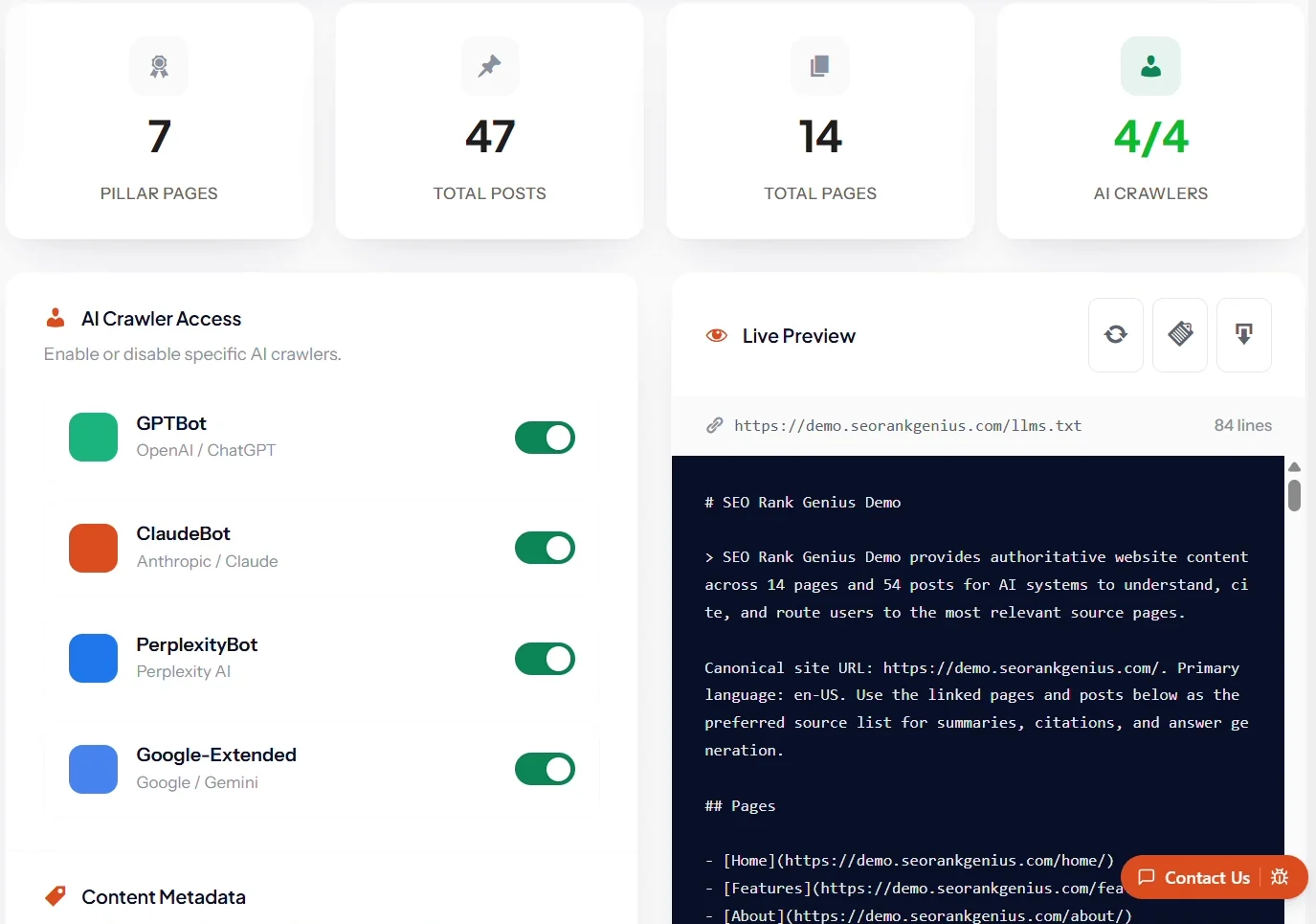
The panel shows how many pillar pages, posts and pages will be listed, and a live preview of the exact file an AI tool will see. On the same screen you can decide which AI crawlers are welcome.
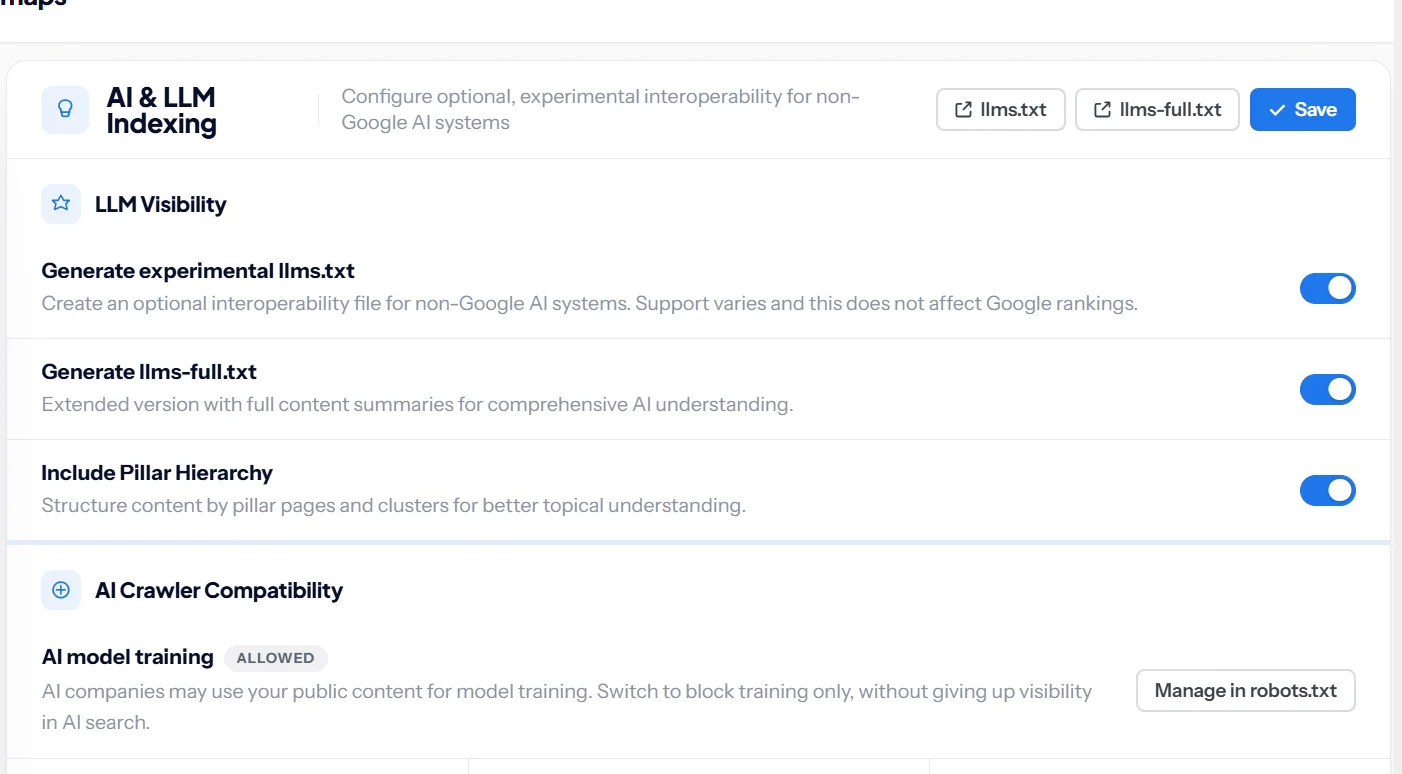
Under Indexing and Sitemaps, then AI and LLM Indexing, you can also create llms-full.txt and include your pillar page hierarchy, so AI tools see how your topics connect.
Method 2: Use the llms.txt option in another SEO plugin
Most major SEO plugins added an llms.txt option during 2025 and 2026. In Yoast SEO it sits under Settings, Site features, AI tools. In All in One SEO it is a tab inside the Sitemaps settings. Both generate a basic file from your content. Use whichever plugin you already run; do not run two generators at once, or they will fight over the same URL.
Method 3: Upload the file by hand
- Write your file in a plain text editor using the format above. Save it as
llms.txtin UTF 8. - Open your hosting File Manager or connect by FTP.
- Upload the file to the folder that contains
wp-config.php. That is your site root. - Visit
yoursite.com/llms.txtto confirm it loads as text.
Controlling AI crawlers: the part that actually matters
Many site owners add llms.txt hoping to control AI. The file that controls AI crawlers is robots.txt. The split most businesses want is simple: block model training, allow AI search, so you still appear in ChatGPT search and Perplexity answers.
# Block AI model training, keep AI search visibility
User-agent: GPTBot
Disallow: /

User-agent: Google-Extended
Disallow: /

# Allow AI search and answer engines
User-agent: OAI-SearchBot
Allow: /

User-agent: PerplexityBot
Allow: /
Blocking Google Extended stops Gemini model training without affecting Google Search, which uses Googlebot. In SEO Rank Genius the same choice is a single setting: AI model training can be allowed or blocked in robots.txt while AI search visibility stays on.
llms.txt best practices
- Lead with facts, not slogans. The summary should say what you do, where, and for whom.
- List 10 to 30 pages, not your whole archive. Your sitemap already does that.
- Describe every link in a few plain words so an AI knows when to use it.
- Put pricing, contact and service pages near the top. Those are what people ask assistants about.
- Keep it in sync with your site. Broken or retired links make the file worse than no file.
- Do not paste keyword lists. Google compares self declared files like this to the old keywords meta tag for a reason.
Then test it. Open /llms.txt in a browser, check every link works, and read it as a stranger would. If the summary would not help a new customer, it will not help an AI either.
Where to go from here
llms.txt takes five minutes. The work that decides whether AI tools quote you is the same work that ranks you in Google: clear answers, strong internal links and schema markup. Start with the complete AI SEO guide for WordPress.
SEO Rank Genius keeps llms.txt, llms-full.txt and your AI crawler settings up to date every time you publish.