WooCommerce SEO: The Complete 2026 Guide to Ranking Your Store and Products
WooCommerce gives you a store, not a store that ranks. Product pages start with thin manufacturer text, filters create thousands of near duplicate URLs, and missing identifiers keep products out of Google’s shopping features. This guide covers the fixes that matter most, in the order I would do them.
What is WooCommerce SEO?
WooCommerce SEO is the work of making a WooCommerce store’s product, category and shop pages easy for search engines to crawl, understand and show, including in Google’s shopping results. The biggest wins are unique product content, complete product schema with price, stock and identifiers, clean category pages, and keeping filter URLs out of the index.
Stores have problems ordinary blogs do not: hundreds of similar pages, variations, out of stock products, and filters that multiply URLs. The checklist below is built around those.
Product page SEO
- Write your own description. Manufacturer text is on hundreds of other sites. Add what you know: who it suits, sizing, what is in the box, how it compares.
- Title and meta: product name, the key attribute people search for (size, material, model) and your brand. Keep titles within about 60 characters.
- Clean URLs:
/product/brass-radiator-key/, not IDs or parameters. WooCommerce’s default product base is fine. - Images: several real photos, descriptive file names and alt text, compressed to WebP.
- Reviews: genuine customer reviews add unique text and can earn review stars.
- Out of stock products: keep the page live if the item is coming back, and link to alternatives. If it is gone for good, 301 redirect it to the closest product or category.
Product schema, identifiers and Merchant Center
Product structured data is what makes a product eligible for price, availability and rating details in Google, and for free merchant listings. WooCommerce outputs some basics; a good SEO plugin completes them.
| Field | Why it matters | Where it comes from |
|---|---|---|
| Name, image, description | Required basics for product results | The product itself |
| Price and currency | Shown in results and shopping listings | WooCommerce price |
| Availability | In stock or out of stock labels | WooCommerce stock status |
| GTIN, MPN or SKU | Matches your product to the same item elsewhere | Product identifiers fields |
| Brand | Helps Google identify the product | Brand field or attribute |
| Review and rating | Star ratings in results | Genuine customer reviews |
| Shipping and return policy | Google shows delivery and returns information | Store wide settings |
Based on Google’s product structured data documentation. Values must match what the page shows.
Category pages: your best ranking pages
For many stores, category pages rank for more valuable searches than single products, because people search for men’s running shoes more than one model.
- Add an introduction of 100 to 200 words at the top or bottom explaining the range and who it is for.
- Give each category a unique title and meta description.
- Link between related categories and from blog posts to the category they support.
- Avoid overlapping categories that target the same search; that is keyword cannibalization for stores.
- Noindex tag archives unless they have real content. Product tags often create thin duplicate pages.
Faceted navigation and filter URLs
Filters by size, colour and price can create a new URL for every combination. Left alone, search engines crawl thousands of thin pages instead of your products.
| Filter page type | Recommended handling |
|---|---|
| Filter combinations nobody searches for | Noindex, and keep them out of the sitemap |
| A filter with real search demand, such as a brand within a category | Turn it into a proper indexable landing page with its own content |
| Sorting parameters like orderby or price order | Canonical to the main category page |
| Pagination | Keep indexable, with a self referencing canonical on each page |
Keep your XML sitemap limited to products and categories you want to rank.
Technical WooCommerce SEO checks
- Speed: product pages carry a lot of scripts. Use caching that excludes cart and checkout, and compress images.
- Cart, checkout and account pages: noindex them. They should never appear in search.
- Variations: one product page for all variations, not a separate indexable page per colour.
- HTTPS and a single domain version, with redirects from the others.
- Instant updates: IndexNow tells Bing about price and stock changes quickly.
Choosing a WooCommerce SEO plugin
| Plugin | WooCommerce support | Price |
|---|---|---|
| Yoast WooCommerce SEO | Dedicated WooCommerce plugin from Yoast | $178.80 a year per site |
| Rank Math | WooCommerce module in the free plugin, more in Pro | Free, Pro from €6.99 a month billed yearly (year one) |
| All in One SEO | WooCommerce SEO in every paid plan | From $99 a year regular price |
| SEO Rank Genius | Store wide WooCommerce settings plus a Product SEO tab on each product | see current plans |
Prices checked 27 September 2026, before tax.
Yoast WooCommerce SEO is the obvious choice if you already use Yoast. Rank Math covers the basics for free. Whichever you choose, check it outputs complete product schema, lets you add identifiers and handles filters.
WooCommerce SEO with SEO Rank Genius
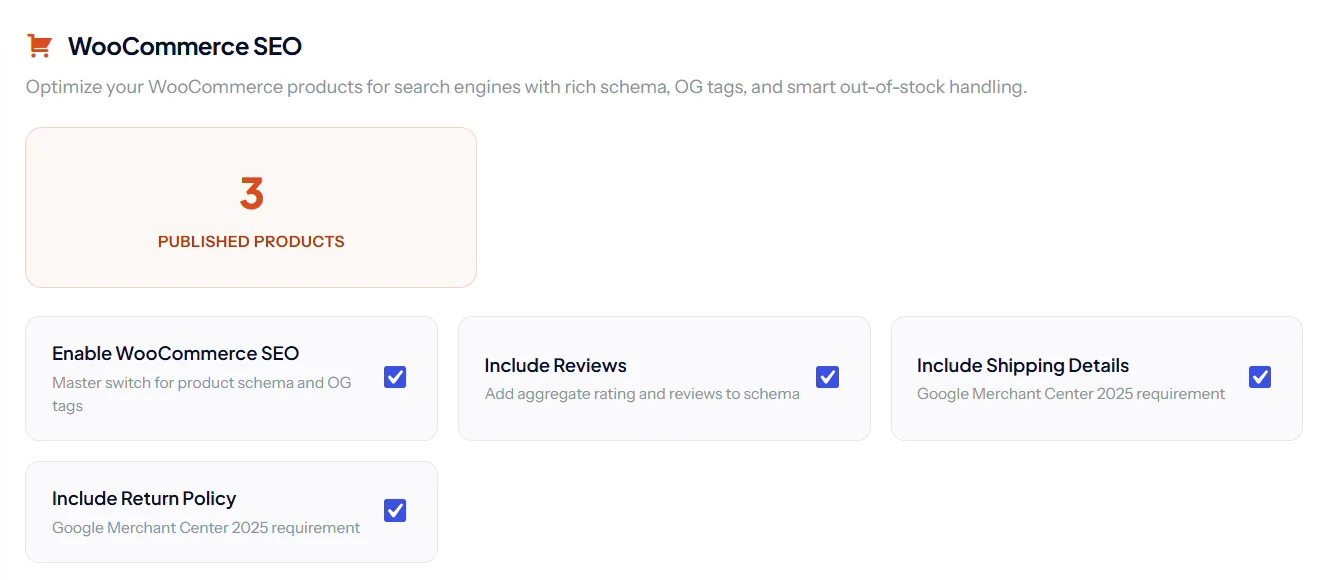
In Tools and Analytics, then WooCommerce SEO, you set store wide defaults for every product: product schema and social tags, review stars, shipping details and your return policy.
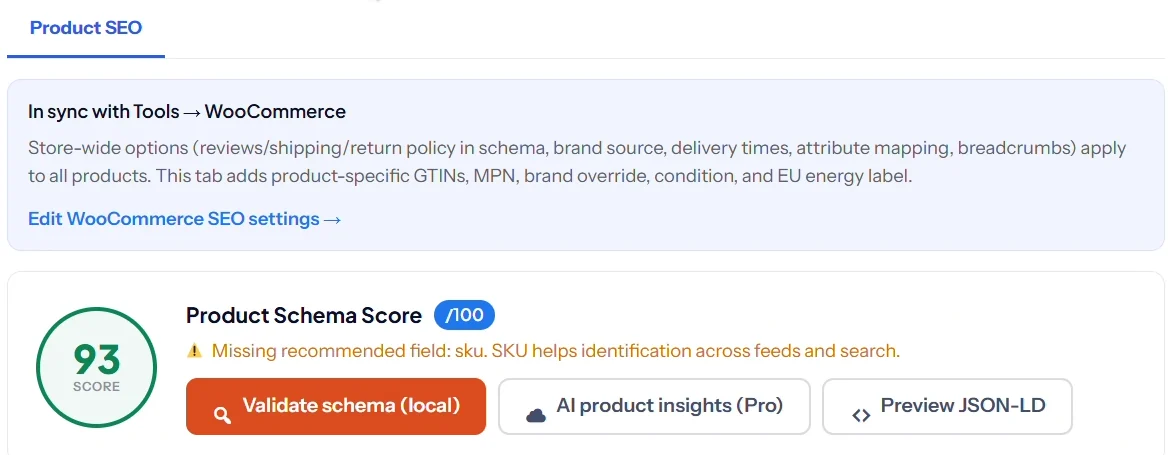
Catalog issue queues list products that block rich results, such as a missing image, GTIN or SKU, and faceted archives can noindex filter URLs. On each product, the Product SEO tab scores the product schema and flags missing fields.
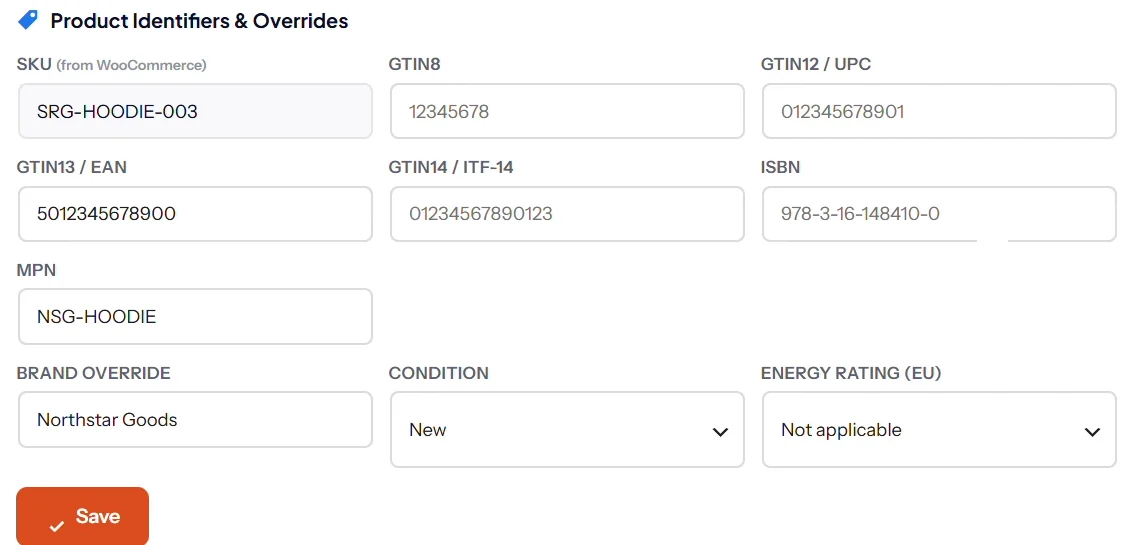
WooCommerce tools are included in every plan; see current pricing.
Keep reading
Get your product markup right with the schema markup guide, then compare plugins in the best SEO plugins for WordPress guide.
SEO Rank Genius sets store wide WooCommerce defaults, finds products that block rich results and scores the schema on every product.