Schema Markup in WordPress: A Plain English Guide for 2026 (Article, Product, FAQ and More)
Schema markup is code that describes your page to search engines in a format they read without guessing. Done right, it earns rich results like star ratings, prices and breadcrumbs. Google changed a lot in 2026, including removing FAQ rich results, so here is what still works and how to add it in WordPress.
What is schema markup?
Schema markup is structured data added to a web page, usually as a JSON-LD script, that tells search engines exactly what the page contains: an article, a product, a business, an event and so on. It uses the shared Schema.org vocabulary. Google uses it to understand pages and to show rich results such as prices, ratings and breadcrumbs.
Humans read a page and see a recipe with a cooking time. A search engine sees text and has to infer the rest. Schema removes the guessing by stating the facts in a fixed format. Google recommends the JSON-LD format, which sits in a script tag and does not change how the page looks.
Here is a simple Article example:
<script type="application/ld+json">
{
  "@context": "https://schema.org",
  "@type": "Article",
  "headline": "How to Bleed a Radiator in 5 Steps",
  "datePublished": "2026-03-02",
  "dateModified": "2026-09-01",
  "author": { "@type": "Person", "name": "Sam Carter" },
  "publisher": { "@type": "Organization", "name": "Northwind Plumbing" },
  "image": "https://example.com/images/bleed-radiator.jpg"
}
</script>
Does schema markup help SEO?
Schema is not a direct ranking factor. Adding it to a weak page will not lift it up the results. What it does:
- Earns rich results. Product prices and stock, review stars, event dates, recipe details and breadcrumbs can make your listing larger and more clickable.
- Removes ambiguity. Organization and LocalBusiness markup tie your name, address, logo and profiles together as one entity.
- Feeds shopping and local features. Product markup supports Google’s merchant listings alongside Merchant Center.
Which schema types still earn rich results in 2026
Google supports rich results for a specific list of types. Markup outside that list is still valid Schema.org, but it will not produce a special result in Google.
| Schema type | Rich result it can earn | Use it on |
|---|---|---|
| Article | Better title, image and date display | Blog posts and news |
| BreadcrumbList | Breadcrumb trail instead of a raw URL | Every page with breadcrumbs |
| Product with Offer | Price, availability, ratings, merchant listings | Product pages |
| Review snippet | Star rating | Product and service reviews |
| LocalBusiness | Business details in local results | Home or contact page of a local business |
| Organization | Logo and brand knowledge | Home page |
| Event | Dates and venue | Event pages |
| Recipe | Cooking time, ratings, image | Recipe posts |
| VideoObject | Video thumbnail and key moments | Pages with an embedded video |
| SoftwareApplication | Rating and price | App and plugin pages |
| JobPosting | Google for Jobs listing | Job adverts |
Selected from Google’s Search Gallery, last updated 15 June 2026. Discussion forum, Q and A, Profile page, Dataset and a few others are also supported.
What happened to FAQ schema?
FAQPage is still a valid Schema.org type, and leaving the markup on your pages does no harm. Some other systems may still read it. But do not add FAQ sections just to win extra space in Google any more; that no longer happens. Keep FAQs where they genuinely answer questions readers have.
What schema your site needs
| Site type | Essential schema | Worth adding |
|---|---|---|
| Blog | Article, BreadcrumbList, Organization or Person | VideoObject where you embed video |
| Local business | LocalBusiness, Organization, BreadcrumbList | Service pages as Service, Review where genuine |
| Online store | Product with Offer, BreadcrumbList, Organization | Review snippets, shipping and return details |
| Software or SaaS | SoftwareApplication, Organization | Article for the blog |
| Events or courses | Event or Course list | Organization |
Start with the essentials and add more only where the page really contains that information.
Product schema example
Product markup needs at least a name plus an offer, review or rating. For merchant listings, include price, currency and availability:
{
  "@context": "https://schema.org",
  "@type": "Product",
  "name": "Brass Radiator Key",
  "image": "https://example.com/images/radiator-key.jpg",
  "sku": "RK-100",
  "brand": { "@type": "Brand", "name": "Northwind" },
  "offers": {
    "@type": "Offer",
    "price": "4.99",
    "priceCurrency": "GBP",
    "availability": "https://schema.org/InStock",
    "url": "https://example.com/shop/radiator-key/"
  }
}
WooCommerce stores have more to consider, including variants, GTINs and shipping details. The WooCommerce SEO guide covers them.
How to add schema markup in WordPress
Option 1: An SEO plugin (recommended)
Most SEO plugins output a basic graph automatically: Organization, WebSite, WebPage, Article and BreadcrumbList. The difference between plugins is how much control you get over other types and whether you can see and fix what they output.
Option 2: A schema markup generator
Free online schema generators let you fill in a form and copy the JSON-LD. Paste it into a Custom HTML block or your theme’s header. This works for one or two pages, but the code does not update itself when prices or dates change, so it goes stale.
Option 3: Write it by hand
Developers can add JSON-LD in a theme template with values pulled from WordPress fields. It is the most flexible option and the most work to maintain.
Adding schema with SEO Rank Genius
In SEO Rank Genius, Indexing and Sitemaps, then Structured Data is a schema command centre with an Auto mode and a Manual mode. The counters show how many posts have schema, which are missing it, which have protected manual edits and whether any have errors. It also shows notices when Google changes its rules, like the FAQ change above.
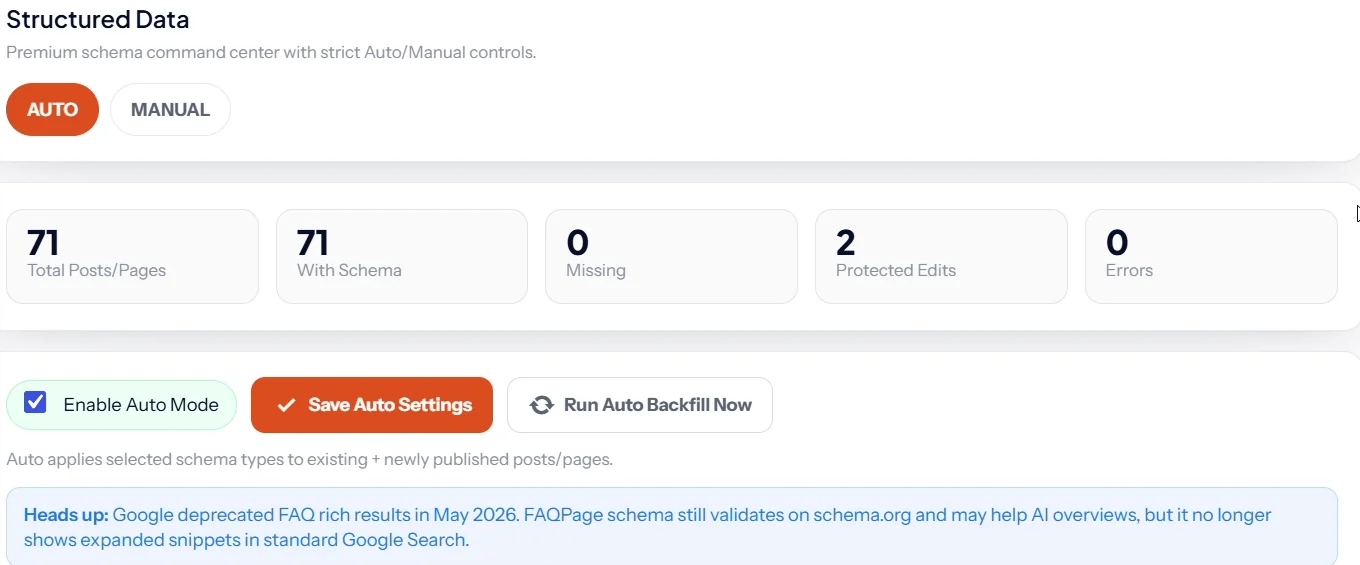
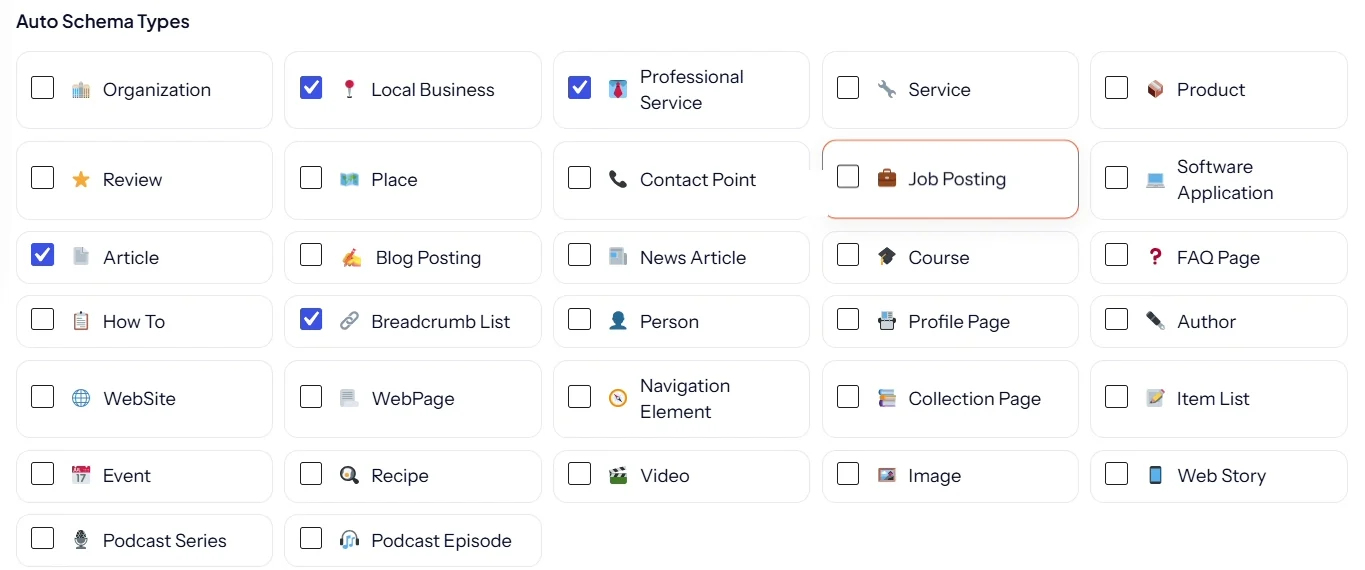
In Auto mode you tick the schema types to apply, from Local Business and Product to Recipe, Event and Video, then run a backfill to add them to every existing post. New posts get schema when they are published.
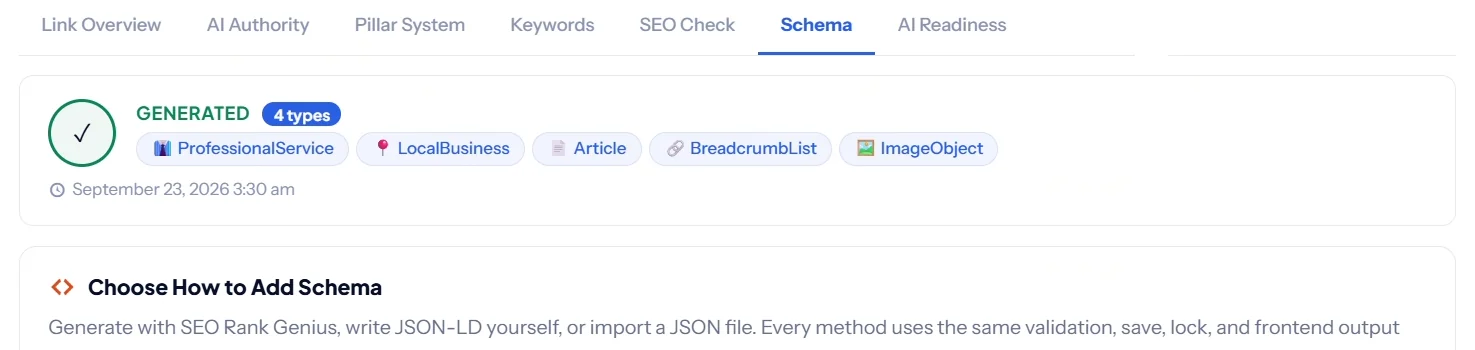
Inside each post, the Schema tab shows the types already generated. You can generate more with AI, write them manually, import a JSON file, and preview the final JSON-LD before it goes live.
Schema tools are included in every plan; see current pricing.
How to test your schema
- Rich Results Test (search.google.com/test/rich-results) shows which Google rich results the page is eligible for and flags errors.
- Schema Markup Validator (validator.schema.org) checks any Schema.org type, including ones Google does not show as rich results.
- Search Console reports valid items and errors for each supported type under Enhancements, once Google has crawled the pages.
- View the source of the live page and search for
application/ld+jsonto make sure only one plugin is outputting schema.
Schema mistakes that cost you rich results
- Markup that does not match the page. Every value in the schema must be visible to visitors. Hidden prices or invented ratings break Google’s rules.
- Self serving reviews. Review stars for your own business on your own site are not eligible for LocalBusiness and Organization rich results.
- Two plugins outputting schema. Duplicate graphs confuse parsers. Disable schema in one of them.
- Stale values. Old prices or out of stock items marked InStock can cost you merchant listings.
- Chasing removed features. FAQ and HowTo rich results are gone; do not rebuild pages around them.
Keep reading
Schema is one part of being understood by search and AI systems. The AI SEO guide covers the rest, and the WordPress SEO checklist puts it in order with everything else.
SEO Rank Genius applies schema automatically, lets you edit or generate it per post, and warns you when Google changes the rules.